Why AI is Important in Digital Marketing? (2026)
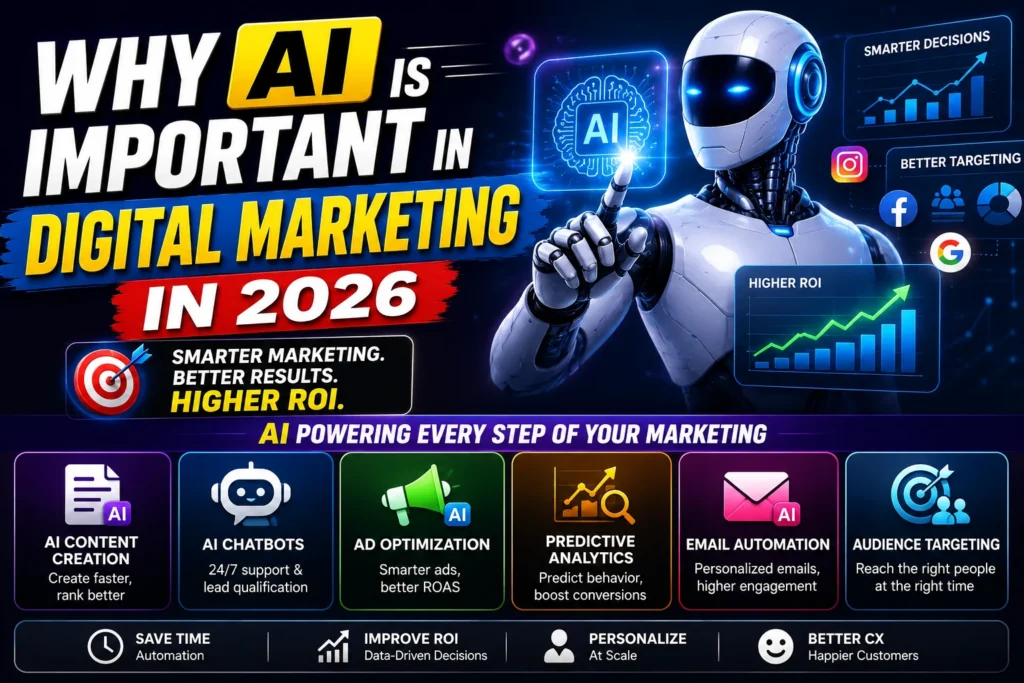
Explore why AI is important in digital marketing in 2026. Learn how AI improves content, ads, targeting, analytics, email automation, and customer experience to boost ROI. AI isn’t a “nice-to-have” in digital marketing anymore—it’s a competitive advantage. In 2026, marketers are expected to do more with less: create more content, run faster campaigns, analyze more data, and personalize experiences across multiple channels. That’s exactly where AI in digital marketing becomes essential. AI helps businesses automate repetitive tasks, analyze customer behavior, personalize campaigns, and improve customer experience—while saving time and improving ROI. This article breaks down why AI is important in digital marketing, what AI actually does behind the scenes, the top use cases (content, chatbots, ad optimization, predictive analytics, email automation, audience targeting), and how beginners and businesses can use AI effectively without losing brand authenticity. What Does AI Mean in Digital Marketing? AI (Artificial Intelligence) in digital marketing refers to technology that can: learn from data (customer behavior, clicks, purchases) Identify patterns humans may miss predict outcomes (who will convert, what will perform) automate tasks (content, ads, emails, chat) personalize experiences at scale Simple definition:AI in marketing = data-driven automation + smarter decision-making. Why AI Is Important in Digital Marketing in 2026 1) Marketing Is Too Fast for Manual Work Customer behavior changes quickly—platforms update weekly, trends shift daily, and ad performance fluctuates in real time. AI helps marketers respond faster by: monitoring performance continuously adjusting campaigns automatically suggesting improvements based on data 2) Personalization Is Now Expected People don’t want generic marketing. They expect messages that feel relevant: right product right time right offer right channel AI makes personalization possible at scale by segmenting audiences and tailoring content automatically. 3) Data Is Huge (AI Makes It Actionable) Businesses collect data from: websites ads platforms CRMs emails social media AI helps turn this data into insights like: Which audience converts best Which creative will likely win What customers want next 4) AI Improves ROI by Reducing Waste AI-driven optimization helps reduce: wasted ad spend low-quality leads irrelevant traffic Poor email engagement The result is better performance with fewer resources. Core Benefits of AI in Digital Marketing ✅ Time Savings (Automation) AI reduces time spent on: writing drafts creating variations reporting segmentation repetitive customer responses ✅ Better Decisions (Analytics + Prediction) AI identifies patterns such as: Which users are likely to buy Which ad creatives will perform Which email sequences convert ✅ Higher Conversions (Personalization) AI can personalize: product recommendations landing page content ads messaging email subject lines ✅ Consistent Optimization (Always-On Improvement) AI tools can continuously test and optimize: ads bidding targeting placements creatives AI-Powered Tools Used in Digital Marketing Below are the major areas where AI is already transforming marketing. 1) AI for Content Creation (Faster, Smarter Content) AI helps marketers create and improve content faster, including: blog outlines and drafts social media captions ad copy variations video scripts SEO meta titles/descriptions content repurposing (blog → reel → carousel) Where AI Helps Most speeding up content production generating multiple angles quickly overcoming writer’s block optimizing for clarity and structure Best Practice (Important) AI should support your content—not replace your expertise. What works best in 2026:AI draft + human experience + real examples + brand tone. 2) AI Chatbots (24/7 Customer Support + Lead Qualification) AI chatbots are used to: Answer FAQs instantly qualify leads (budget, needs, location) book appointments provide product recommendations reduce customer support load Why This Matters Customers want instant answers. If they wait, they leave. AI chatbots help businesses: increase lead capture improve response time boost customer satisfaction Example use case:A real estate chatbot asking: “What is your budget?” “Which location are you interested in?” “When do you want to visit?” That’s direct lead qualification—automated. 3) AI for Ad Optimization (Better ROAS, Smarter Spending) AI has changed performance marketing heavily. AI is used in ads to: Optimize bidding automatically Find winning audiences faster Test creative combinations Adjust placements based on performance Reduce cost per lead (CPL) and cost per acquisition (CPA) Platforms Where AI is Already Built In Google Ads (Smart Bidding, Performance Max) Meta Ads (Advantage+ audiences, AI optimization) YouTube/Shorts ad delivery systems Why This Matters Manual ad optimization is slow. AI can: respond in real time scale winners faster reduce human guesswork Important note:AI improves results only when tracking is correct (GA4, Pixel, conversions). 4) Predictive Analytics (Forecast What Customers Will Do Next) Predictive analytics uses AI to forecast behaviors like: Who is likely to buy Who is likely to churn What product might someone purchase next When customers typically convert How Marketers Use It to prioritize high-quality leads to run smarter remarketing campaigns to improve email timing to plan inventory and offers (e-commerce) Example:If AI predicts that visitors from a certain keyword convert 3x higher, you can: Increase ad budgets for that segment Create more content around that intent 5) AI for Email Automation (Smarter Segmentation + Better Engagement) Email still performs in 2026—but generic email blasts don’t. AI improves email marketing by: segmenting users automatically personalizing subject lines optimizing send times recommending product/email content predicting who will open/click What This Leads To higher open rates higher click rates better conversions fewer unsubscribes AI-powered email automation makes your emails feel more relevant and less “spammy.” 6) AI for Audience Targeting (Reach the Right People) Audience targeting is one of the biggest reasons businesses waste ad spend. AI helps by: analyzing behavior patterns creating lookalike audiences detecting purchase intent signals improving retargeting accuracy optimizing audiences over time Instead of guessing, AI continuously refines targeting based on results. Key insight:AI doesn’t replace your strategy—it improves your targeting once your funnel is clear. How AI Improves Customer Experience (CX) Customer experience is a ranking factor, conversion factor, and retention factor. AI improves CX through: faster support (chatbots) personalized recommendations better onboarding sequences smarter follow-ups reducing friction at each step When customers feel understood, conversions increase. Real-World Examples of AI in Digital Marketing Example 1: Content Repurposing AI turns: one blog post → 5 Reels
Why AI is Important in Digital Marketing? (2026) Read More »