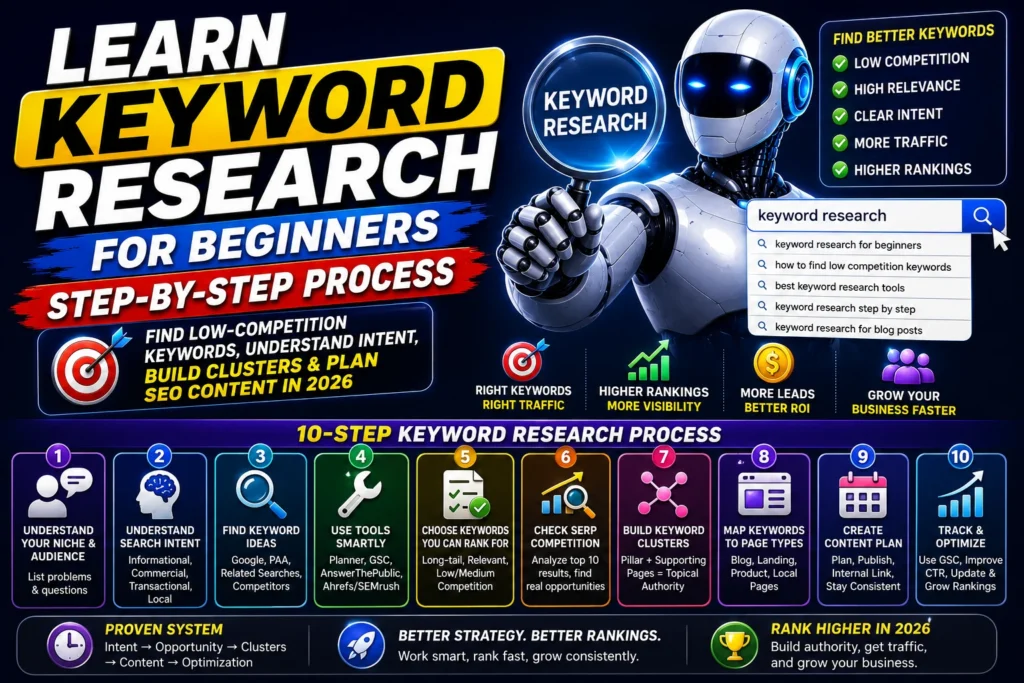
Learn keyword research for beginners with a step-by-step process to find low-competition keywords, understand search intent, build clusters, and plan SEO content in 2026.
If you’re starting with SEO, keyword research can feel confusing—tools show hundreds of numbers, everyone gives different advice, and you’re left wondering: Which keywords should I actually target?
Here’s the truth: keyword research is not about chasing high search volume. It’s about understanding what people want (intent), finding opportunities you can realistically rank for, and building a content plan that consistently grows traffic.
From my experience working on 25+ SEO projects and optimizing 45+ websites, the websites that grow fastest are the ones that follow a simple system:
Intent → Opportunity → Clusters → Content → Optimization
This guide will teach you keyword research for beginners in a practical way—so you can find keywords, plan content, and start ranking.
(Internal link suggestion: Link this article to your pillar guide: How to Start Digital Marketing from Scratch and to your SILO article: SEO for Beginners.)
What is Keyword Research?
Keyword research is the process of finding the words and phrases people type into Google and selecting the best ones to target with your content or pages.
But in modern SEO, it’s more than “finding keywords.” It’s about:
- Understanding search intent
- Finding rankable opportunities
- Creating topic clusters
- Matching keywords to the right page type (blog, landing page, product page)
Why Keyword Research Matters in 2026
Keyword research matters more in 2026 because:
- Google (and AI search) rewards intent-matching content, not keyword stuffing
- Competition is higher, so you need smarter targeting
- Keyword clusters help build topical authority
- CTR matters—choosing the right angle/title can increase clicks without higher rankings
- Businesses care about leads and sales, so keyword intent decides ROI
A keyword is valuable only if it brings the right user, not just traffic.
Step-by-Step Keyword Research Process for Beginners
Step 1: Start With Your Niche + Customer Problems
Before tools, you need clarity.
Ask:
- Who is my audience?
- What problems do they have?
- What do they search for before buying?
Example niches + problem-to-keyword ideas:
- Real estate: “best location to buy a flat in…”
- E-commerce: “best shampoo for…” / “how to choose…”
- Services: “cost of…” / “near me” / “best agency for…”
Beginner tip: Write a list of 20–30 customer questions first. Tools come later.
Step 2: Understand Search Intent (This Decides What You Rank For)
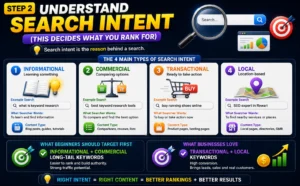
Search intent is the reason behind a search.
The 4 Main Types of Intent
- Informational: learning something
- “What is keyword research?”
- Commercial: comparing options
- “best keyword research tools”
- Transactional: ready to take action
- “Buy running shoes online.”
- Local: location-based
- “SEO expert in Rewari”
What beginners should target first:
✅ Informational + Commercial long-tail keywords (easier to rank, strong traffic potential)
What businesses love:
✅ Transactional + Local keywords (high conversion)
Step 3: Find Keyword Ideas
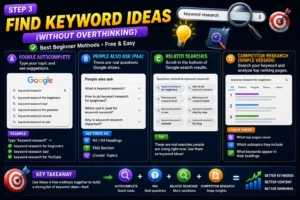
Here are the best beginner methods (free + easy):
A) Google Autocomplete
Type your topic and see suggestions.
Example:
Type “keyword research” →
“keyword research for beginners”
“keyword research tool”
“keyword research for YouTube”
B) People Also Ask (PAA)
These are real questions Google shows.
Use these as:
- H2/H3 headings
- FAQ section
- cluster topics
C) Related Searches
Scroll to the bottom of Google search results.
D) Competitor Research (Simple Version)
Search your keyword and look at:
- What top pages cover
- Which subtopics they include
- What keywords appear in their headings
(Internal link suggestion: Link “intent” and “SEO basics” to your SEO for Beginners article.)
Step 4: Beginner-Friendly Tools for Keyword Research
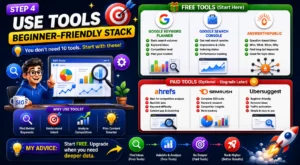
You don’t need 10 tools. Start with these:
Free tools
- Google Keyword Planner (basic volumes + ideas)
- Google Search Console (once you have a site)
- AnswerThePublic (question-based keyword ideas)
Paid tools (optional)
- Ahrefs / SEMrush (best for competition + clustering)
- Ubersuggest (simple beginner tool)
My advice: Start free. Upgrade when you need deeper data.
Step 5: Choose Keywords You Can Actually Rank For
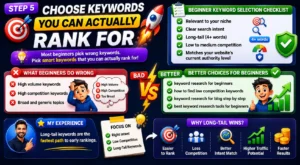
This is where most beginners fail.
They pick:
- high volume
- high competition
- broad topics
Instead, use this selection checklist:
✅ Beginner Keyword Selection Checklist
Choose keywords that are:
- Relevant to your niche
- Clear intent
- Long-tail (4+ words)
- Low to medium competition
- Match your website’s current authority level
Good vs Bad Keyword Examples
❌ Bad for beginners:
- “SEO”
- “digital marketing”
- “keyword research”
✅ Better for beginners:
- “keyword research for beginners”
- “How to find low competition keywords.”
- “Keyword research for blog step by step.”
- “best keyword research tools for beginners”
From my experience: long-tail keywords are the fastest path to early rankings.
Step 6: Understand Keyword Difficulty (Without Getting Stuck)
Keyword difficulty (KD) is a metric some tools use to estimate competition.
But don’t rely only on KD. Use real SERP checks.
Quick SERP Competition Check
Search the keyword and look at:
- Are top results huge authority sites? (Wikipedia, big brands)
- Are results exactly matching the keyword intent?
- Are there weak pages with thin content?
- Are there forums or low-quality pages ranking?
If you see:
✅ smaller blogs ranking
✅ outdated content
✅ weak formatting
…you have a good chance.
Step 7: Build Keyword Clusters (How You Rank Faster)
Google doesn’t just rank pages—it ranks topics.
So instead of creating random posts, build clusters.
What is a Keyword Cluster?
A cluster is a group of related keywords that can be covered in one topic area.
Example: Keyword Research Cluster
Pillar (main page):
- Keyword Research for Beginners
Supporting cluster articles:
- How to find low competition keywords
- Best keyword research tools for beginners
- Search intent explained
- Keyword clustering guide
- Keyword research for blog posts
This strategy builds topical authority and helps all articles rank better through internal linking.
(Internal link suggestion: Link this cluster to your pillar digital marketing guide and your SEO guide.)
Step 8: Map Keywords to the Right Page Type
Not every keyword should be a blog post.
Here’s a simple mapping:
- Informational keywords → Blog posts
- Commercial keywords → Comparison / list posts
- Transactional keywords → Landing pages
- Product keywords → Product pages / collection pages
- Local keywords → Location service pages
This mapping improves conversions and avoids publishing the wrong type of content.
Step 9: Create a Content Plan (Beginner Content Calendar)
Once you have your clusters, plan content.
Beginner Weekly Plan
- 2 blog posts per week (cluster-based)
- 1 refresh/update old content per week (later)
- 1 internal linking session per week
Simple Content Formula (That Works)
- Problem → Why it matters → Step-by-step solution → Examples → Checklist → FAQs
Step 10: Track Performance and Improve (The Fast Growth Loop)
Once you publish, keyword research continues through data.
Use:
- Google Search Console to see:
- what keywords you’re getting impressions for
- which pages have low CTR
- which pages are close to page 1
My weekly keyword optimization routine:
- Open Search Console
- Find keywords with impressions but low clicks
- Improve title + meta description (CTR boost)
- Add missing subtopics
- Add internal links from relevant pages
- Re-submit for indexing if needed
This “optimize loop” is one of the fastest ways to grow traffic without publishing new content every day.
Keyword Research Checklist (Quick Summary)
Use this every time:
✅ Identify niche + audience problems
✅ Find keyword ideas (Google + tools)
✅ Understand intent (info/commercial/transactional/local)
✅ Choose long-tail + low competition keywords
✅ Check SERP manually
✅ Create clusters (pillar + support)
✅ Map keywords to page types
✅ Build content plan
✅ Track in Search Console and optimize
Common Keyword Research Mistakes Beginners Make
Avoid these:
- Choosing keywords only based on search volume
- Ignoring search intent
- Targeting broad, competitive keywords too early
- Writing separate articles for keywords that should be one cluster
- Not checking SERP competition
- Not updating titles/meta based on CTR data
- No internal linking (slows down ranking growth)
30-Day Keyword Research Action Plan (Beginner-Friendly)
Week 1
- Pick your niche
- List 20 customer problems
- Find 30 keyword ideas from Google
Week 2
- Use a tool to validate keywords
- Choose 10 long-tail keywords
- Build 2 clusters
Week 3
- Publish 2–3 articles targeting cluster keywords
- Add internal links between them
Week 4
- Check Search Console
- Improve titles/meta for CTR
- Expand content where needed
Keyword research is the foundation of SEO—but it becomes powerful only when you treat it like a system:
Intent → Opportunity → Clusters → Content → Optimization
If you’re a beginner, focus on:
- long-tail keywords
- search intent
- keyword clustering
- consistent publishing + optimization
That’s how you build rankings that compound over time.
FAQs
What is keyword research for beginners?
Keyword research for beginners is the process of finding search terms people use on Google and selecting low-competition, intent-based keywords you can rank for with helpful content.
How do I find low competition keywords?
Use long-tail keywords, check “People Also Ask,” analyze the top 10 results, and target keywords where smaller websites are already ranking.
Which tool is best for keyword research?
For beginners, Google Keyword Planner and Google Autocomplete are enough. For deeper data, Ahrefs or SEMrush are best.
How many keywords should I target in one article?
Usually one primary keyword plus 5–15 related secondary keywords (natural variations). Focus on covering the topic fully rather than repeating keywords.
What is keyword clustering in SEO?
Keyword clustering means grouping related keywords into a pillar page and supporting content. It helps build topical authority and improves rankings faster.
Author – Navdeep Kr –
I am a digital marketer who creates content about SEO, Meta Ads, Google Ads, Website Development, and e-commerce growth strategies. I create genuine, experience-based solutions for store owners, marketers, and entrepreneurs to improve business results. If you believe that your online business is not progressing as expected. Don’t hesitate to get in touch with me to access all your online solutions in one place.