If you want to learn digital marketing from scratch in 2026, you probably want one thing: a clear path you can follow without getting overwhelmed.
I’ve been in digital marketing for 5+ years, worked on 45+ websites and 25+ SEO projects, and managed real campaigns across real estate, healthcare, and e-commerce. I didn’t learn by only watching tutorials—I learned by building websites, running Google and Meta ads, fixing technical SEO issues, and improving conversion rates using real user data.
This is the guide I wish I had when I started: digital marketing for beginners, broken into a practical, step-by-step system you can execute.
What is Digital Marketing?
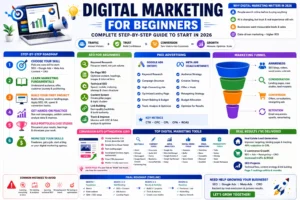
Digital marketing is the process of attracting, converting, and retaining customers online using channels like:
- SEO (free traffic from Google)
- Paid Advertising (Google Ads, Meta Ads)
- Content Marketing (blogs, landing pages, product content)
- Social Media Marketing
- Email & Retention
- Analytics & Optimization (GA4, Search Console, tracking)
Simple definition:
Digital marketing = Traffic + Trust + Conversion, measured by data.
Why Digital Marketing is Important in 2026
In 2026, digital marketing is more important than ever because:
- People search online before buying anything (even local services).
- AI is changing how content is discovered, but human trust + real experience still wins.
- Businesses are competing on speed, creativity, and performance tracking.
- The brands that win are the ones that can measure ROI and optimize continuously.
From my work across industries, the biggest shift I’ve seen is this:
Businesses don’t want “marketing.” They want leads, sales, and measurable growth.
Step-by-Step Digital Marketing Roadmap
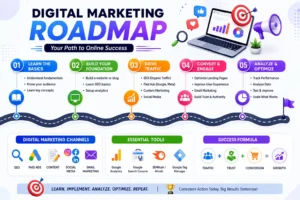
This is the exact digital marketing roadmap I recommend if you’re starting from zero.
Step 1: Choose Your Skill
Digital marketing is huge. Beginners fail when they try to learn everything together.
Pick one “core skill” first:
- SEO (best long-term skill, high career value)
- Google Ads (fast results, performance-based)
- Meta Ads (creative + targeting, great for lead gen)
- Content Marketing (SEO + authority)
- CRO (conversion rate optimization, high impact)
My recommendation for beginners:
Start with SEO for beginners, then add Google Ads for beginners once you understand customer intent and landing pages.
Step 2: Learn Marketing Fundamentals
Before tools, you need fundamentals. This is what makes you a marketer—not just someone who clicks buttons.
Learn:
- Target audience: Who you’re marketing to
- Problem awareness: What pain are you solving
- Offer clarity: What you’re selling and why it matters
- Customer journey: Awareness → Consideration → Decision
- Positioning: Why someone should choose you
A quick example:
- “What is SEO?” = awareness stage
- “Best SEO tools” = consideration stage
- “Hire SEO expert” = decision stage
This is how you match content and ads to intent.
Step 3: Build Your First Project
You don’t become good at digital marketing by reading. You become good by building.
Pick one project:
- A simple WordPress blog (best for SEO learning)
- A basic Shopify demo store (best for e-commerce)
- A single landing page (best for ads + CRO)
Your first project should teach you these real skills:
- Website structure and UX
- SEO basics (indexing, content, internal linking)
- Speed + mobile optimization
- Conversion-focused writing (CTA, layout)
Portfolio Tip:
Document everything (before/after screenshots, analytics notes, results). That becomes your first case study.
SEO for Beginners (A Step-by-Step Guide)
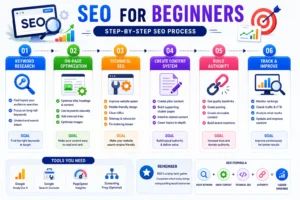
SEO (Search Engine Optimization) is one of the most powerful skills in digital marketing because it helps you generate consistent, free traffic from Google. From my experience working on 25+ SEO projects, I’ve seen that most beginners struggle not because SEO is hard—but because they don’t follow a structured process.
Here’s a clear, step-by-step SEO system you can follow as a beginner:
1. Start with Keyword Research (Focus on Intent, Not Just Volume)
Keyword research is the foundation of SEO. But instead of chasing high-volume keywords, focus on what users are actually searching for and why.
What I do in real projects:
- Identify long-tail keywords (easier to rank)
- Group keywords based on search intent
- Build clusters instead of isolated topics
Example:
- “SEO” ❌ (too competitive)
- “SEO for beginners step by step” ✅
- “how to do keyword research for blog” ✅
👉 This approach helps you rank faster and attract the right audience.
2. Optimize Your Content (On-Page SEO Basics)
Once you have your keyword, the next step is optimizing your page so Google understands it.
Basic On-Page SEO Checklist:
- Include your keyword in:
- Title (H1)
- First 100 words
- Subheadings (H2/H3)
- Write clear, structured content (easy to scan)
- Add internal links to related pages
- Use bullet points and short paragraphs
- Optimize images (alt text + compression)
👉 In many of my projects, simply improving on-page SEO has led to noticeable ranking improvements without building backlinks.
3. Fix Technical SEO (Make Your Website Google-Friendly)
Even great content won’t rank if your website has technical issues.
Key things to check:
- Your pages are indexed in Google (via Search Console)
- Your site loads fast (Core Web Vitals)
- Your website is mobile-friendly
- Clean URL structure (example: /seo-for-beginners)
- Proper sitemap and robots.txt setup
👉 From experience, fixing technical SEO issues often unlocks rankings for content that was already good.
4. Build a Content System (Not Just One Blog)
One blog post won’t rank your website—you need a content system.
How I structure SEO content:
- Create a pillar page (like this digital marketing guide)
- Add supporting articles (clusters)
- Link everything together
Example:
- Pillar: Digital Marketing Guide
- Clusters:
- SEO for beginners
- Keyword research guide
- On-page SEO checklist
👉 This builds topical authority, which is a major ranking factor today.
5. Build Authority (Off-Page SEO Basics)
Google also looks at how trustworthy your website is. This comes from backlinks (links from other websites).
Beginner-friendly strategies:
- Guest posting on niche blogs
- Creating valuable content people want to link to
- Basic directory/profile submissions
👉 Focus on quality over quantity—a few strong links are better than many weak ones.
6. Track and Improve (SEO is Continuous)
SEO is not “publish and forget.” It’s publish → track → improve.
Tools I use:
- Google Search Console
- Google Analytics 4
- Shemrush
What to monitor:
- Clicks & impressions
- Keyword rankings
- CTR (click-through rate)
- Page performance
My weekly process:
- Find pages getting impressions but low clicks
- Improve titles and meta descriptions
- Update content
- Add internal links
👉 This simple optimization loop can significantly increase traffic over time.
SEO works best when you treat it like a system, not a one-time task. From my experience across multiple projects, the pages that perform well are the ones that:
- Match search intent
- Are well-structured
- Are technically sound
- Keep improving over time
If you follow this step-by-step approach, you’ll build a strong SEO foundation that supports everything else in digital marketing.
Paid Advertising (Google Ads + Meta Ads)
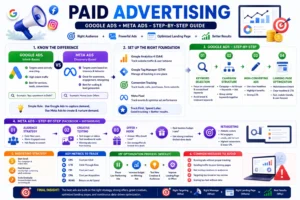
Paid advertising is the fastest way to generate leads, traffic, and sales, but only if you approach it strategically. From my experience running campaigns across industries like real estate, healthcare, and e-commerce, I’ve learned that ads don’t fail because of the platform—they fail because of poor structure, weak targeting, or bad landing pages.
Here’s a practical, beginner-friendly system to run profitable campaigns using Google Ads and Meta Ads:
1. Understand the Difference (Google Ads vs Meta Ads)
Before running ads, you need to understand how these platforms work:
Google Ads (Intent-Based):
- Targets users actively searching
- Best for: services, high-intent leads
- Example: “buy an apartment in Delhi”
Meta Ads (Discovery-Based):
- Targets users based on interests/behavior
- Best for: awareness, lead generation, retargeting
👉 Simple Rule I Follow:
- Use Google Ads to capture demand
- Use Meta Ads to create and nurture demand
2. Set Up the Right Foundation (Tracking is Everything)
Most beginners waste money because they don’t track properly.
Before running ads, set up:
- Google Analytics 4 (GA4)
- Google Tag Manager (GTM)
- Conversion tracking (form submits, purchases, calls)
- Meta Pixel (for Facebook/Instagram ads)
👉 If tracking is wrong, your optimization will always be wrong.
From experience:
Fixing tracking alone has improved campaign performance because decisions became data-driven.
3. Google Ads Setup Step-by-Step Guide
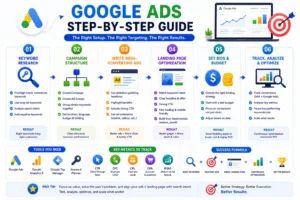
Based on the structured workflow shown above, running successful Google Ads campaigns comes down to 6 clear steps—from keyword research to continuous optimization. This is the same practical flow I follow in real campaigns to generate high-quality leads and better ROI.
1. Keyword Research (Target the Right Intent)
Everything starts with choosing the right keywords.
Focus on:
- High-intent, commercial keywords
- Long-tail keywords (lower competition, higher conversion)
- Understanding search intent (what the user actually wants)
Also important:
- Add negative keywords to avoid irrelevant clicks
👉 Result:
Right keywords bring the right customers, not just traffic.
2. Campaign Structure (Build a Clean Foundation)
A well-structured campaign improves performance significantly.
Setup includes:
- Create campaigns based on goals (leads, sales, traffic)
- Create multiple ad groups
- Group similar keywords together
- Set:
- Location targeting
- Language
- Budget
- Bidding strategy
👉 Result:
A clean structure leads to better control and higher efficiency.
3. Write High-Converting Ads (Your First Impression)
Your ad copy determines whether users click or ignore you.
Best practices I use:
- Write attention-grabbing headlines
- Highlight clear benefits (not just features)
- Include a strong CTA (Call-to-Action)
- Use ad extensions (sitelinks, callouts, etc.)
👉 Result:
Better ads = higher CTR (Click-Through Rate) and more traffic.
4. Landing Page Optimization (Where Conversions Happen)
Even the best ads won’t work if your landing page is weak.
Your landing page should:
- Match the keyword intent
- Have a clear headline and offer
- Include strong CTA buttons
- Load fast and be mobile-friendly
- Build trust (reviews, testimonials, proof)
👉 Result:
Better landing pages = more leads and sales.
5. Set Bids & Budget (Smart Spending Strategy)
You don’t need a huge budget—you need the right strategy.
What to do:
- Choose the right bidding strategy (CPC, CPA, etc.)
- Start with a test budget
- Focus on conversions, not just clicks
- Adjust based on performance data
👉 Result:
Smart bidding leads to lower cost and higher ROI.
6. Track, Analyze & Optimize (Where Real Growth Happens)
This is where most beginners fail—they don’t optimize.
You must:
- Track conversions using:
- Google Ads
- Google Analytics 4 (GA4)
- Analyze key metrics
- Pause low-performing keywords and ads
- Scale what’s working
👉 Result:
Continuous optimization = maximum ROI over time.
Tools You Need
To run effective Google Ads campaigns, you should use:
- Google Ads (campaign management)
- Google Analytics 4 (performance tracking)
- Google Tag Manager (event tracking)
- Keyword Planner (keyword research)
Key Metrics to Track
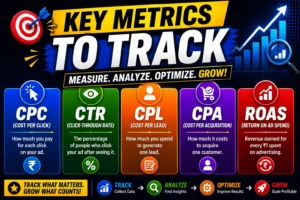
Focus on these core metrics:
- CTR (Click-Through Rate) → Are people clicking your ads?
- CPC (Cost Per Click) → How much you pay per click
- CPL (Cost Per Lead) → Cost to generate a lead
- CPA (Cost Per Acquisition) → Cost per customer
- ROAS (Return on Ad Spend) → Profitability
Pro Tip (From Real Experience)
Always align your keywords → ads → landing page with the same intent.
And follow this cycle:
- Test
- Analyze
- Optimize
- Scale
Success Formula
The entire Google Ads system can be simplified into this:
Right Keywords + Relevant Ads + Optimized Landing Page + Continuous Optimization = Better Results
This structured approach ensures that your campaigns are not just running—but consistently improving and generating real business results.
Meta Ads Setup Step-by-Step Guide (Facebook + Instagram)
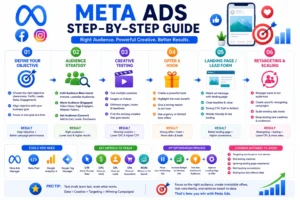
Meta Ads are powerful for scaling and retargeting.
Step 1: Audience Strategy
Split your audience into:
- Cold Audience: new users (interests, lookalikes)
- Warm Audience: engaged users (page visits, video views)
- Hot Audience: ready to convert (cart, leads)
👉 This structure improves efficiency and lowers cost.
Step 2: Creative Testing (MOST IMPORTANT)
On Meta, creatives decide success.
Test:
- Images vs videos
- Different headlines
- Different hooks
👉 Winning ads come from testing, not guessing.
Step 3: Offer + Hook
Your ad must answer:
- Why should I care?
- Why now?
Examples:
- “Get 20% off today”
- “Free consultation for first-time clients”
Step 4: Retargeting (Where Profit Happens)
Retarget:
- Website visitors
- People who clicked ads
- Users who engaged with content
👉 This is where conversion rates are highest.
5. Budgeting & Optimization Strategy
You don’t need a huge budget—you need smart allocation.
Beginner Budget Strategy:
- Start small (test phase)
- Identify winning ads
- Scale gradually
📊 Key Metrics to Track
- CPC (Cost per Click)
- CTR (Click-through rate)
- CPL (Cost per Lead)
- CPA (Cost per Acquisition)
- ROAS (Return on Ad Spend)
🔁 My Optimization Process
Every week:
- Pause low-performing ads
- Increase budget on winners
- Test new creatives
- Improve landing page
👉 Consistent optimization = better ROI over time.
6. Common Mistakes to Avoid
From real campaign experience, avoid these:
- Running ads without tracking
- Sending traffic to poor landing pages
- Not testing creatives
- Targeting too broad or too narrow
- Scaling too fast without data
Paid advertising is not about spending more—it’s about spending smarter. The campaigns that perform best are the ones where:
- Targeting is clear
- Ads match user intent
- Landing pages convert
- Data is used for optimization
If you combine Google Ads (intent) + Meta Ads (scaling + retargeting) with proper tracking and CRO, you can build a system that consistently generates leads and revenue.
Marketing Funnels Explained
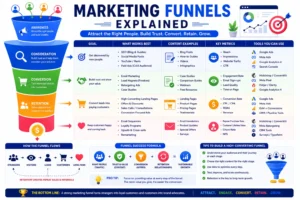
A marketing funnel is the system that turns clicks into customers.
Here’s a simple funnel you can use:
Funnel Stage 1: Awareness
- SEO blogs
- Reels/short videos
- Cold audience ads
Funnel Stage 2: Consideration
- Landing pages
- Case studies
- Lead magnets (free checklist, guide)
Funnel Stage 3: Conversion
- Offers
- Consultation calls
- Retargeting ads
Funnel Stage 4: Retention
- Email sequences
- Upsells
- Remarketing
Key insight:
Traffic doesn’t convert because people “aren’t ready.” Funnels help move them forward.
Conversion Rate Optimization (CRO)
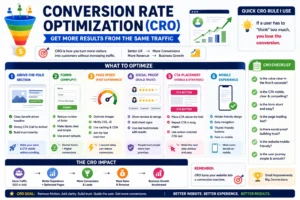
Conversion rate optimization is how you get more results from the same traffic.
This matters for both SEO and paid ads.
What to optimize:
- Above-the-fold section (headline, CTA, trust)
- Forms (reduce fields, increase clarity)
- Page speed
- Social proof (reviews, client logos, testimonials)
- CTA placement
- Mobile experience
Quick CRO rule I use:
If a user has to “think” too much, you lose the conversion.
(Internal link suggestion: Read my Landing Page Optimization Checklist.)
Top Digital Marketing Tools
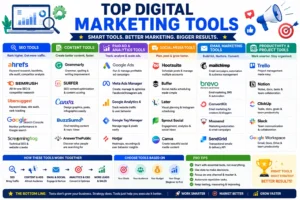
Here are digital marketing tools I use and recommend:
| SEO Tools | Content Tools | Paid Ads & Analytics | Social Media Tools | Email Marketing | Productivity & Project Tools |
|---|---|---|---|---|---|
| Ahrefs keyword research, backlinks, and site audit | Grammarly Grammar & writing improvement | Google Ads: Run ad campaigns | Hootsuite: Schedule & manage posts | Mailchimp Email campaigns & automation | Trello Project Management |
| SEMrushSEO & competitor research | Surfer SEO Content optimization | Meta Ads Manager, Facebook & Instagram ads | BufferSocial scheduling | BrevoEmail, SMS & automation | NotionDocs & collaboration |
| UbersuggestKeyword ideas & tracking | CanvaDesign graphics easily | Google Analytics 4Track traffic & users | Later, Instagram planning | ConvertKitCreator email marketing | ClickUpTasks & productivity |
| Google Search Console: Monitor search performance | BuzzSumo: Trending content ideas | Google Tag Manager: Manage tracking tags | Sprout Social Analytics & engagement | Moosend Email automation | SlackTeam communication |
| Screaming Frog Technical SEO crawler | AnswerThePublicSearch insights | HotjarHeatmaps & behavior insights | CanvaSocial creatives | SendGridTransactional emails | Google Workspace Docs, Drive & Gmail |
Real Case Studies (Use My Experience)
Below are real-style case studies based on the type of work I’ve delivered.
Case Study 1: Real Estate Lead Generation (CPL Reduced by 40%)
Goal: Generate high-quality property leads at a lower cost
Challenge: Leads were expensive and quality was inconsistent
What I did (Step-by-Step):
- Audited existing campaigns and removed low-performing audiences
- Built a new audience structure:
- Cold interest targeting
- Lookalikes (where applicable)
- Retargeting for page visitors
- Tested multiple creatives (image + copy variations)
- Improved landing page:
- Clear headline + offer
- Stronger CTA
- Faster load speed
- Better form structure
- Tracked CPL, CTR, and conversion rate weekly and optimized
Results:
- 📉 40% reduction in CPL
- ✅ Improved lead quality through better targeting + landing page alignment
Key lesson: CPL drops when ad intent + landing page intent match perfectly.
Case Study 2: E-commerce Growth (SEO + Ads + Retargeting)
Goal: Improve traffic and ROAS for an e-commerce brand
Challenge: Paid traffic wasn’t converting consistently; organic growth needed scaling
What I did (Step-by-Step):
- Implemented SEO improvements:
- Product page SEO (titles, descriptions, internal linking)
- Collection page optimization
- Content planning based on search intent
- Improved tracking and attribution (GA4 + conversion events)
- Ran Google Ads focused on high-intent keywords
- Ran Meta retargeting for:
- View content
- Add to cart
- Initiate checkout
- Worked on CRO improvements:
- Better product page UX
- Improved trust elements
Results:
- 📈 Increased organic traffic through consistent SEO execution
- 💰 Improved ROAS using Google Ads + Meta retargeting + CRO
Key lesson: E-commerce wins when you combine traffic + trust + conversion (not just ads).
Case Study 3: SEO Projects (Page 1 Rankings in 6 Months)
Goal: Rank important business keywords and grow organic traffic
Challenge: Low visibility + technical issues + inconsistent content
What I did (Step-by-Step):
- Technical SEO audit:
- Indexing fixes
- Core Web Vitals improvements
- Internal linking cleanup
- Keyword research and clustering:
- Grouped keywords by intent and topic
- Content optimization:
- Updated pages for on-page SEO
- Added FAQs for featured snippets
- Search Console monitoring:
- Improved CTR using better titles + meta descriptions
Results:
- 🚀 Multiple keywords ranked on Page 1 within 6 months
- 📈 Organic traffic increased consistently month-over-month
Key lesson: SEO results come from systems, not single posts.
Common Mistakes Beginners Should Avoid
Here are the mistakes I see beginners make constantly:
- Trying to learn every channel at once
- Running ads without conversion tracking
- Ignoring technical SEO issues
- Writing content without keyword intent
- Not building a portfolio or documenting results
- Not testing and optimizing (marketing is never “done”)
Final Roadmap
If you want a clear roadmap, follow this:
Month 1: Foundation
- Learn basics + choose one skill
- Build a website or landing page
- Learn analytics basics (GA4 + Search Console)
Month 2–3: Skill Building
- SEO: keyword research + on-page + content publishing
- Ads: basic campaign setup + landing page alignment
Month 4–6: Results + Portfolio
- Build 2–3 strong projects
- Track data weekly
- Write one case study per project
Month 6+: Monetize
- Freelance services
- Apply for roles
- Start your niche blog or agency model
Conclusion
Learning how to start digital marketing isn’t about memorizing definitions. It’s about building real projects, tracking results, and improving continuously.
I built my skills through real execution—working on 45+ websites, handling 25+ SEO projects, and running campaigns that improved metrics like CPL and ROAS. If you follow the same approach—start small, practice consistently, and learn from data—you’ll grow faster than most people.
If you want guidance, collaboration, or digital marketing support, feel free to connect.
FAQs
What is digital marketing for beginners?
Digital marketing for beginners means learning how to promote products online using SEO, ads, content, social media, and analytics to drive traffic and conversions.
How long does it take to learn digital marketing?
You can learn the basics in 3–6 months, but getting strong results typically takes 6–12 months of consistent practice and real projects.
Is digital marketing a good career?
Yes. Digital marketing is in high demand across industries and offers job opportunities, freelancing, remote work, and business growth potential.
Can I learn digital marketing without a degree?
Yes. Skills, real projects, and measurable results matter more than degrees in digital marketing.
Which skill should I start with?
Start with SEO (best long-term foundation), then expand into Google Ads, Meta Ads, and conversion optimization.
Author – Navdeep Kr –
I am a digital marketer who creates content about SEO, Meta Ads, Google Ads, Website Development, and e-commerce growth strategies. I create genuine, experience-based solutions for store owners, marketers, and entrepreneurs to improve business results. If you believe that your online business is not progressing as expected. Don’t hesitate to get in touch with me to access all your online solutions in one place.