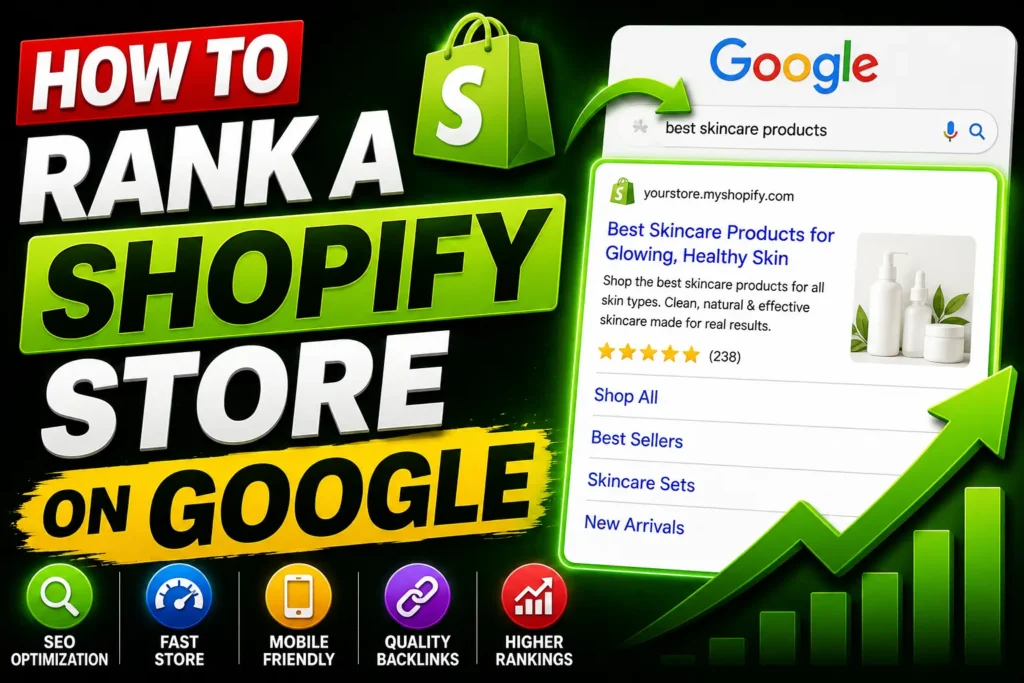
How to Rank a Shopify Store on Google in 2026: A Step-by-Step Guide to building a clean-looking store, adding good products, and setting up their payment gateway.
How to Rank a Shopify Store on Google in 2026
Ranking a Shopify store on Google requires far more than installing an SEO app and sprinkling keywords into product titles. In 2026, Google’s AI-driven algorithms evaluate topical authority, page speed, structured data, and user experience as interconnected ranking signals. And with Shopify powering roughly 30% of U.S. ecommerce websites, organic search is one of the fiercest competitive arenas for online merchants.
I have worked with Shopify stores across multiple categories — apparel, home goods, supplements, electronics, and accessories — and the stores that rank are not necessarily the ones with the biggest budgets. They are the ones who get the fundamentals right consistently across every layer of SEO.
This is the complete, step-by-step article to rank a Shopify store on Google in 2026. Every step is in sequence — from technical foundation through to content, links, and AI search visibility. Follow it in order. Skip nothing.
Step 1: First Get Your Technical Foundation Right
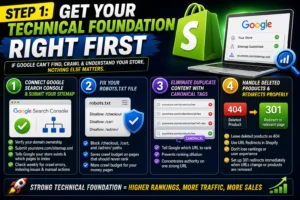
Everything else in this guide depends on Google being able to find, crawl, and understand your store. If the technical foundation is broken, nothing else matters.
1. Connect Google Search Console and Submit Your Sitemap
This is the first thing you do with a new Shopify store — not the last. Go to Google Search Console, verify ownership of your domain, and submit your Shopify sitemap. Shopify automatically generates a sitemap at yourstore.com/sitemap.xml. Submit it. This tells Google your store exists and gives it a map of every page it should index.
Check Search Console weekly for crawl errors, indexing issues, and manual actions. These will surface problems you would otherwise not notice for months.
2. Fix Your robots.txt File
Block the robots.txt.liquid template to block /checkout, /cart, and /admin/ paths. This saves crawl budget on your revenue-generating pages. Google has a limited amount of attention it gives your site on each crawl. Do not waste it on pages that should never rank.
3. Eliminate Duplicate Content With Canonical Tags
Shopify tends to create multiple paths to the same product. Use correct canonical tags in your theme to tell Google: there are three URLs of this product, but rank this particular one.
This is one of Shopify’s most common built-in SEO problems. Left unaddressed, duplicate URLs dilute your ranking potential across multiple pages instead of concentrating it on one.
4. Handle Deleted Products and Redirects Properly
Always leave a deleted product as a 404. Go to Navigation in Shopify and use the URL Redirects to redirect the old traffic to the most appropriate active page without losing your Google position or user experience.
Every time you delete a product and do not redirect the URL, you are throwing away whatever ranking authority that page had built up. Set up 301 redirects immediately when products are removed or URLs change.
Step 2: Build a Clean, Logical Site Structure
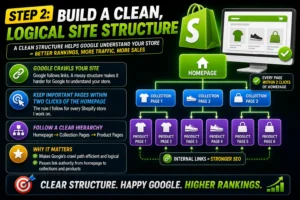
Google crawls your site by following links. If your structure is messy — collections buried deep, orphaned product pages, no clear hierarchy — it becomes harder for Google to understand what your store is about and how pages relate.
The rule I follow for every Shopify store I work on: keep important pages within two clicks of the homepage whenever possible.
Your structure should follow a clear hierarchy: Homepage → Collection Pages → Product Pages. Every product should belong to at least one collection. Every collection should be accessible from the main navigation or a clear category menu.
This serves two purposes. First, it makes Google’s crawl path efficient and logical. Second, it passes link authority from your homepage — your strongest page — down to your collections and products through internal links.
Step 3: Do Keyword Research Mapped to Specific Pages
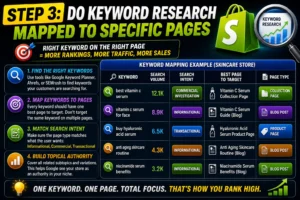
Start by listing your main product categories. Then use Google Autocomplete and Amazon search to see what completions appear for each category. These completions represent real, high-frequency searches. Feed your best keywords into a tool like Ahrefs or Semrush to see search volume, keyword difficulty, and the pages currently ranking.
Map each keyword to a specific page on your store — collection pages for category terms, product pages for specific product searches, and blog posts for informational queries.
This mapping step is critical, and most store owners skip it. Without it, you end up with multiple pages targeting the same keyword — competing with yourself — or important keywords with no page targeting them at all.
The keyword-to-page map should look like this:
- Collection pages → high-volume category keywords (“men’s leather wallets,” “yoga mats for beginners”)
- Product pages → specific product keywords (“slim bifold leather wallet black,” “6mm thick non-slip yoga mat”)
- Blog posts → informational queries (“how to care for a leather wallet,” “what thickness yoga mat do I need”)
Step 4: Optimize Every Product Page Properly

On-page SEO is where most store owners spend their time, and for good reason. It is the content you control completely. Every product page, collection page, and blog post is an opportunity to rank for specific keywords.
1. Title Tags
Your title tag is the headline that appears in search results. It should be under 60 characters and include your primary keyword near the beginning.
The formula is: Brand + Product Name + Key Attribute. Rather than “Summer Dress,” it should be “Azure Silk Maxi Summer Dress – Breathable and Lightweight.” This picks up niche-level searches and improves your ranking significantly.
2. Meta Descriptions
Your meta description is the snippet of text below the title in search results. It does not directly affect rankings, but it influences whether people click. Keep it under 160 characters, include your keyword naturally, and add a clear call to action.
3. Product Descriptions
Google rewards Information Gain in 2026, which is content that is not a duplicate of the manufacturer’s product description. Avoid thin content. Aim for 300 or more words structured as a hook explaining the reason why, followed by benefits, specifications, and social proof.
Write product descriptions as if you are explaining the product to someone who cannot see it — what it is made of, who it is for, what problem it solves, what makes it different from similar products. This level of specificity is what both users and Google reward.
4. Image Optimization
Every product image needs a descriptive, keyword-relevant alt tag. Not “image1.jpg” — “azure-silk-maxi-dress-breathable-lightweight-women.jpg”. This helps Google understand what is in the image and contributes to image search rankings.
Step 5: Treat Your Collection Pages as Landing Pages
This is the most consistently underused ranking opportunity in Shopify.
Collection pages often have more potential to rank for high-volume category keywords, and most store owners leave them completely bare. Adding original introductory text to each collection page — even 100 to 150 words — helps. Include the category keyword naturally. Write a proper meta title and description. These pages should be treated like landing pages, not just filtered product grids. A well-optimised collection page can rank for terms that bring in large volumes of top-of-funnel traffic consistently.
For each collection page: write an original paragraph describing what the collection contains and who it is for. Add the target keyword naturally in the first sentence. Write a meta title and description. Link internally to related collections and your most important products.
That is it. Most of your competitors have not done this. Doing it properly puts you ahead of the majority of Shopify stores in your category.
Step 6: Add Structured Data for Rich Results
Structured data acts as a direct route to rich results on Google. Unless your product displays a star rating, price, and In Stock indicator directly in the search results, your click-through rate will drop by 30 to 50 percent compared to competitors who do.
Shopify themes often include basic product schema, but it is worth verifying using Google’s Rich Results Test tool. At a minimum, your product pages should have:
- Product schema — name, price, availability, description
- Review schema — aggregate rating and review count
- BreadcrumbList schema — shows the page hierarchy in search results
For blog posts and FAQ pages, add Article schema and FAQPage schema, respectively. These increase your chances of appearing in Google’s AI Overviews and People Also Ask sections.
Step 7: Build a Content Strategy Around Your Products
Blog posts target informational keywords your product pages cannot rank for. They build topical authority, create internal linking opportunities, and attract backlinks. Stores with active blogs typically see two to three times more organic traffic than stores without them.
The strategy is straightforward. For every product category you sell in, there are dozens of informational questions buyers ask before they purchase. “What is the difference between X and Y,” “How to choose the right Z,” “best type of W for [specific use case].” Your blog answers these questions — ranks for them — and links to your relevant collection and product pages.
This builds what Google in 2026 calls topical authority. You are not just a store selling yoga mats. You are the source of expertise on yoga equipment — and Google treats your product pages as significantly more credible because they exist within an ecosystem of genuine, helpful content.
Aim for at least one quality post per week. Consistency matters more than volume. A blog with 52 focused, genuinely useful posts published over a year outperforms a blog with 200 thin posts published in a month.
Step 8: Optimize for Page Speed
Page speed is a direct Google ranking factor — and it is an area where many Shopify stores underperform unnecessarily.
Run your store through Google PageSpeed Insights. Target a score above 70 on mobile. The most common speed issues on Shopify stores are:
- Uncompressed images — convert all images to WebP format and compress them before uploading
- Too many apps — every installed Shopify app loads additional scripts. Remove any app you are not actively using
- Heavy themes — some premium Shopify themes add significant load time. Test your theme’s impact on speed
- Render-blocking JavaScript — use a developer or a tool like Plug in SEO to identify and defer non-critical scripts
Google’s AI-driven algorithms evaluate page speed and user experience as interconnected ranking signals. A slow store loses rankings and converts buyers poorly — a double penalty.
Step 9: Build Backlinks Through Genuine Value
Avoid buying links or participating in link schemes. Google’s spam detection has improved dramatically in 2025 and 2026, and a manual penalty can suppress your rankings for months. Focus on earning links through genuinely valuable content and authentic relationships.
The methods that actually work for Shopify stores in 2026:
- Digital PR — create original data or research relevant to your industry. A study, a survey, a report. Journalists and bloggers in your niche will link to original data they can reference.
- Supplier and partner links — if you stock products from specific brands or work with suppliers, ask them to link to your store from their “Where to Buy” or stockist pages.
- Genuine product reviews — send products to relevant bloggers, YouTubers, and newsletter writers in your niche in exchange for honest reviews. These generate both links and social proof.
- Content-driven link earning — write the most comprehensive guide on a topic in your niche. Something so genuinely useful that other stores and blogs in your category reference it naturally over time.
Step 10: Optimise for AI Search Visibility
This is the layer of SEO that did not exist two years ago and is now essential.
Google’s AI Overview pulls quick answers from well-structured pages. Voice search and People Also Ask rely on simple, direct responses. By adding structured content, question-based topics, and schema, you increase your store’s visibility in AI-driven search.
For your Shopify store, this means:
- Add a FAQ section to your most important product and collection pages — structured as clear question-and-answer pairs
- Use the FAQ Page schema to mark these up so Google can surface them in AI Overviews and People Also Ask boxes
- Write in direct, specific language — use short definitions, clear headings, fast page speed, and answer-focused content to appear in the AI Overview
- Make sure your product pages answer the pre-purchase questions buyers actually ask: “Is this suitable for X?” “What size should I get?” “How long does delivery take?”
Ranking a Shopify store in 2026 is no longer about keywords alone — it requires AI-friendly content, Answer Engine Optimisation, speed improvements, and a strong brand presence.
Step 11: Track, Measure, and Improve
None of this works without measurement. Set up the following before you do anything else and review them weekly:
- Google Search Console — impressions, clicks, average position, crawl errors, and indexing status.
- Google Analytics 4 — organic traffic, conversion rate by landing page, bounce rate.
- Google PageSpeed Insights — Core Web Vitals scores monthly.
- Rank tracking — use Ahrefs, Semrush, or a free alternative to track your target keywords weekly
The stores that rank consistently are not the ones that optimize once and walk away. They are the ones who review what is working, identify what is not, and make small, consistent improvements every week.
The Reality About Shopify SEO
Unlike paid ads that stop the moment you pause your budget, SEO compounds over time. A well-optimized Shopify store built in 2026 can generate significant traffic for years without ongoing ad spend.
But it takes time. A new store with no domain authority will not rank for competitive keywords in the first three months. You will rank for long-tail, lower-competition keywords first — and as your authority builds, you work toward the more competitive terms.
The timeline for realistic results: three to six months to see meaningful movement on low-competition keywords. Six to twelve months to build genuine organic traction. Beyond twelve months of consistent effort, organic becomes your most valuable and scalable channel.
Do not let that timeline discourage you. Every step you complete compounds today into results that paid advertising cannot buy, and competitors cannot easily replicate.
Start with the technical foundation. Build the structure. Optimize every page. Create content that earns trust. Get links through genuine value. Measure everything.
That is how a Shopify store ranks on Google in 2026.
Author – Navdeep Kr –
I am a digital marketer who creates content about SEO, Meta Ads, Google Ads, Website Development, and e-commerce growth strategies. I create genuine, experience-based solutions for store owners, marketers, and entrepreneurs to improve business results. If you believe that your online business is not progressing as expected. Don’t hesitate to get in touch with me to access all your online solutions in one place.